Dievio
html
B2B Lead Lists for Professional Services: Build Consulting Prospect Lists That Convert
Building a prospect list for a B2B consulting firm is fundamentally different than generating leads for SaaS or e-commerce. If you are an outbound operator in professional services, you know the pain point intimately. You have a list of 500 contacts, you launch a sequence, and you get three replies. The problem isn't your copy; it's the quality of the data and the precision of your targeting. Standard B2B lead lists often fail because they treat a specialized consultancy like a generic software vendor. They lack the nuance required to navigate long sales cycles, complex buying committees, and niche service offerings.
This guide is designed for the operator who needs to move beyond guesswork. We will walk through the mechanics of defining an Ideal Customer Profile (ICP) for consulting firms, selecting the right data filters, validating contact accuracy to protect your domain reputation, and integrating these lists into a multi-channel outbound workflow. By the end of this article, you will have a blueprint for building high-quality B2B prospect lists that actually convert.
Why Professional Services Targeting Is Different
When you are selling a $50 software subscription, the decision is often made by a single user or a small team. In professional services, the economics are vastly different. You are selling expertise, time, and strategic outcomes. This creates a unique set of challenges for lead generation that generic B2B data simply cannot solve.
First, consider the sales cycle. Consulting engagements often span months or even years. A standard outbound campaign designed for a 30-day close will feel like a slap in the face to a procurement manager who is planning for the next fiscal quarter. Your lead list needs to target people who are planning for that future, not just those looking for an immediate fix.
Second, the buying committee is larger and more fragmented. A decision to hire a strategic advisory firm involves the CFO, the COO, and potentially external stakeholders. If your list only captures the "Chief Marketing Officer," you are missing the economic buyer. If you target the "End User," you are missing the champion who needs to sell the idea internally. Standard lists rarely segment by role function in a way that respects this hierarchy.
Finally, niche expertise matters. A firm specializing in healthcare compliance cannot target a retail bank, even if the revenue is similar. The service offering dictates the list. Generic databases often group industries too broadly, leading to high bounce rates and wasted outreach credits. To succeed, you need a list that understands the intersection of industry vertical, service category, and firm growth stage.
According to industry standards for B2B lead generation, Salesforce emphasizes that successful strategies must align with specific customer needs rather than broad demographics. For professional services, this means your list must reflect the specific problems you solve, not just the size of the company.
Defining Your Ideal Consulting Client Profile
Before you touch a single filter, you must define the ICP. This is the foundation of your entire campaign. If your ICP is vague, your data will be vague. For consulting firms, the ICP is multidimensional. You need to look at firm size, industry vertical, service category, geography, and growth stage.
Consider a management consulting firm targeting mid-market manufacturing. They are not looking for the smallest startups that cannot afford their rates, nor the largest enterprises that have in-house strategy teams. They are looking for the "sweet spot" of complexity and budget. This requires specific data points that go beyond just "Company Name" and "Email."
Here is a breakdown of the critical ICP dimensions for professional services:
| Dimension | Criteria Example | Why It Matters |
|---|---|---|
| Firm Size | 50-500 Employees | Ensures budget authority and complexity matching. |
| Industry Vertical | Healthcare, FinTech, Manufacturing | Matches specific regulatory or operational expertise. |
| Revenue | $10M - $100M | Indicates ability to pay for premium services. |
| Service Specialty | IT Advisory, M&A, Compliance | Ensures the prospect needs your specific skillset. |
| Geography | North America, EMEA | Matches time zones and local market knowledge. |
| Growth Stage | High Growth, Expansion | Identifies companies actively hiring or scaling. |
Many operators make the mistake of over-filtering at this stage. If you filter for "Revenue > $50M" AND "Industry = Healthcare" AND "Job Title = VP" AND "Company Founded > 5 years," you might end up with zero results. You must balance specificity with coverage. For guidance on finding this balance, see how to use lead search filters without killing coverage. You want enough data to build a list of 100-200 high-quality prospects, not 500 low-quality ones.
Key Data Fields for Consulting Prospect Lists
Once you have defined your ICP, you need to know what data fields to request. For professional services, the data requirements are slightly more complex than standard outbound. You are often selling to a person, but the decision is made by a group.
These are the must-have fields for your list:
- Firm Name: Essential for CRM entry and personalization.
- Decision-Maker Name: You need the specific individual to personalize the email.
- Job Title: Critical for determining seniority and role function.
- Email Address: The primary channel for outreach.
- Phone Number: Essential for multi-channel sequencing.
- LinkedIn URL: Allows for social prospecting and enrichment.
- Revenue/Employee Count: Validates the ICP match.
- Service Specialty: Helps you tailor the messaging to their needs.
Nice-to-have enrichment fields include recent funding events, specific technology stacks, or recent news mentions. These fields allow you to add context to your outreach. For example, if a prospect just raised Series B funding, your message about "scaling operations" will hit harder than a generic pitch.
Filter Selection for Professional Services Lists
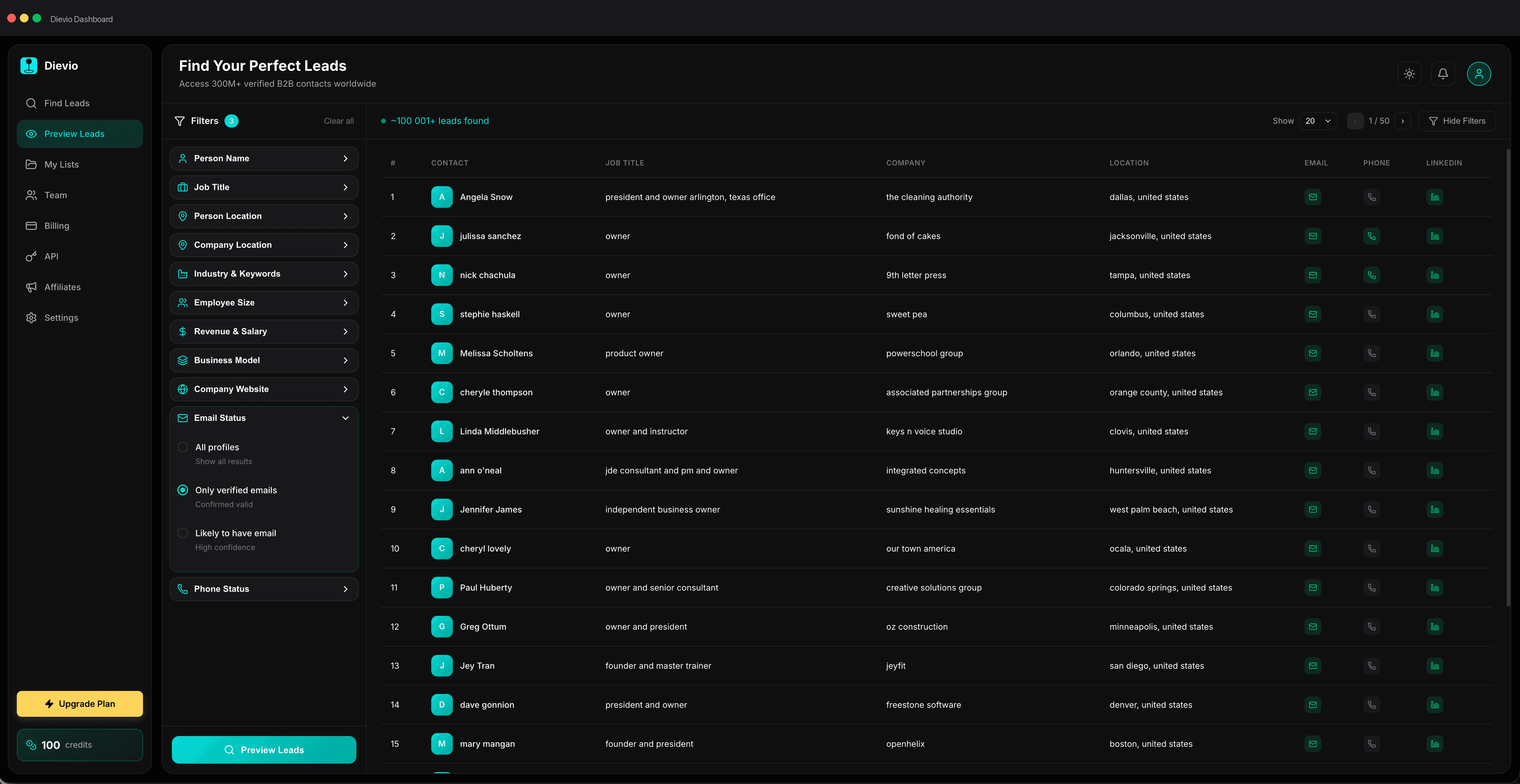
Now we move to the technical execution. How do you select the filters in your lead search tool to capture the right people? The goal is to capture decision-makers across management consulting, IT advisory, and specialized services without drowning in irrelevant data.
You should start with the industry filter. For a consulting firm, this is the most critical filter. If you are selling cybersecurity consulting, you are not targeting a retail chain. You are targeting a financial institution or a tech firm. Narrow this down first.
Next, apply the company size filter. This is where you filter out the companies that are too small to afford your services or too large to need them. For mid-market consulting, you might target companies with 100 to 500 employees.
Then, select the job title. In professional services, you are often looking for specific roles like "Chief Information Officer," "Head of Operations," or "Director of Strategy." Avoid generic titles like "Manager" unless you are targeting a specific niche.
Finally, consider seniority level. You want to target people who have the authority to sign off on the engagement. This usually means "Director," "VP," "C-Level," or "Owner." Avoid targeting "Intern" or "Junior Analyst" roles.
For a deeper dive into the mechanics of filtering, check out best filters for building B2B prospect lists faster. It covers the nuances of combining filters to maximize your yield. Remember, the more filters you add, the smaller your list gets. You need to find the sweet spot where you have enough data to run a campaign but not so much that you waste time on unqualified leads.
Validating Contact Accuracy Before Outreach
This is the step most operators skip, and it is the most dangerous. Sending emails to invalid addresses damages your domain reputation. If your bounce rate exceeds 5%, your emails will land in spam folders, and your outreach will die. For professional services, where trust is paramount, a spam folder is a non-starter.
Before you export your list, you must validate the contacts. This involves checking the syntax of the email address, verifying the domain exists, and confirming the mailbox is active. You should also validate phone numbers. If you are calling, a disconnected number is a dead lead.
Here is a checklist for validation:
- Email Syntax Check: Ensure there are no typos in the address.
- Domain Verification: Confirm the domain is not blacklisted.
- Mailbox Verification: Ensure the email actually exists and is not a catch-all.
- LinkedIn Profile Check: Verify the person is still at the company and in the role.
- Phone Number Validation: Ensure the number is active and mobile.
B2B data coverage, accuracy, and validation is a critical step before buying or using any list. You should never assume the data is fresh. Professional services firms change roles frequently, and an email address from six months ago might be obsolete today. HubSpot's guide on sales prospecting also emphasizes the importance of starting with clean, verified data to protect deliverability.
Use a tool that allows you to preview the leads before you export. This saves you money on credits and ensures you are only paying for valid data. If you find a high percentage of invalid emails, stop and refine your search criteria.
Building the Prospect List: Step-by-Step Workflow
Now that you understand the theory, let's look at the practical workflow. This is the process you should follow every time you build a list for a consulting campaign.
Step 1: Define ICP Write down the specific criteria for your ideal client. Include industry, size, and role. Do not skip this step.
Step 2: Select Filters Apply the filters in your search tool. Start broad and narrow down. Check the preview count to ensure you have enough data.
Step 3: Run Preview Use the preview feature to see sample results. Check if the data looks accurate. If the sample looks bad, refine the filters.
Step 4: Validate Contacts Run the validation check on the full list. Remove any invalid emails or phone numbers.
Step 5: Export and Enrich Export the list. If you need more data, use LinkedIn lookup to enrich the profiles with additional context.
Step 6: Score and Prioritize Assign a score to each lead based on their likelihood to buy. Focus your outreach on the highest-scoring leads first.
Generally, you should preview to validate the search logic, then export only after validation. This prevents wasting credits on bad data. For additional guidance on when to preview versus export, see when to export leads versus refine the search.
Prioritizing Contacts Within Consulting Firms
Once you have your list, you need to prioritize. Not all contacts on the list are equal. In professional services, the buying committee is key. You need to identify the Economic Buyer, the Technical Evaluator, the End User, and the Champion.
The Economic Buyer is the person who controls the budget. This is usually the CFO or COO. They care about ROI and risk.
The Technical Evaluator is the person who evaluates the solution. This is usually the CTO or Head of Operations. They care about implementation and technical fit.
The End User is the person who will use the service. They care about ease of use and support.
The Champion is the person who advocates for you internally. They care about your reputation and value.
LinkedIn Sales Solutions provides detailed guidance on lead scoring that applies well to complex buying committees. Assign points based on the role, the company size, and the engagement level. Focus your outreach on the Economic Buyer first, as they have the most power to close the deal. Lead scoring models for outbound can help you automate this process for professional services campaigns.
However, do not ignore the Champion. In consulting, the Champion is often the one who convinces the Economic Buyer to say yes. Your outreach should target the Champion with a different message than the Economic Buyer.
Integrating Lead Lists Into Outbound Sequences
Having a clean list is useless if you don't integrate it into your workflow. Professional services sales cycles are long, so your outbound sequence needs to be multi-channel and patient.
Email is the primary channel, but it is not enough. You need to supplement with LinkedIn and phone calls. LinkedIn allows you to engage with the prospect before you send the email. You can comment on their posts or send a connection request with a note.
Phone calls are critical for professional services. A quick call to a decision-maker can build trust faster than an email. If you are calling, ensure you have the phone number validated. If the number is invalid, do not call. It wastes time and annoys the prospect.
Your cadence should be designed for the longer cycle. Do not send 10 emails in a week. Send one email, wait a few days, then follow up. If they don't respond, try a different channel. If they still don't respond, move on to the next lead.
When you hand off the list to your sales team, ensure the data is clean. Include the notes you gathered during the enrichment process. This helps the sales team personalize their pitch and close the deal faster. For a detailed guide on multi-channel sequencing, read multi-channel outbound sequencing for email, LinkedIn, and phone.
Common Mistakes When Building Professional Services Lists
Even experienced operators make mistakes. Here are the most common pitfalls when building lists for professional services.
Over-Filtering: This is the number one mistake. You filter for too many criteria, and your list becomes too small to be effective. If you have less than 50 leads, you cannot run a campaign. You need to balance specificity with volume.
Ignoring Data Decay: Data decays over time. An email address that was valid six months ago might not be valid today. You need to refresh your list regularly. For professional services, refresh every 3-6 months.
Targeting Too Broadly: If you target "All Industries," you will get irrelevant leads. You need to be specific about the industry vertical. A consulting firm specializing in healthcare cannot target a retail bank.
Skipping Validation: As mentioned earlier, skipping validation damages your domain reputation. Always validate before outreach.
Ignoring Compliance: Professional services often deal with sensitive data. Ensure your list building complies with GDPR, CCPA, and other relevant regulations. For detailed compliance guidelines, see B2B data compliance within GDPR and CCPA boundaries.
Measuring Lead List Quality
How do you know if your list is good? You need to measure the quality of the data against the results of your outreach. Here are the key KPIs to track.
Contact Accuracy Rate: This is the percentage of emails that are valid. A good rate is above 90%. If it is lower, your validation process is failing.
Deliverability Rate: This is the percentage of emails that land in the inbox. A good rate is above 95%. If it is lower, your domain reputation is at risk.
Response Rate: This is the percentage of emails that get a reply. A good rate is above 5%. If it is lower, your messaging or targeting is off.
Meeting Conversion: This is the percentage of replies that result in a meeting. A good rate is above 20%. If it is lower, your sales team needs to improve their follow-up.
Tracking these metrics helps you optimize your campaign. If your accuracy rate is low, focus on validation. If your response rate is low, focus on messaging.
Do not rely on vanity metrics like "number of leads sent." Focus on the quality of the leads and the conversion rate. This is what drives revenue.
Conclusion and Next Steps
Building B2B lead lists for professional services requires a different approach than standard outbound. You need precision, validation, and a deep understanding of the buying committee. Generic lists will not work for consulting firms. You need a strategy that targets the right people at the right time.
By defining your ICP correctly, selecting the right filters, validating your contacts, and integrating your list into a multi-channel workflow, you can build a prospect list that converts. The key is to treat your list as a strategic asset, not just a database of names.
If you are ready to start building your list, you need the right tools. You need a platform that allows you to filter by industry, size, and role, and that provides accurate, validated data. You need a platform that helps you manage your outreach workflow and measure your results.
Stop wasting time on bad data. Start building professional services lead lists that actually convert. Build Professional Services Lead Lists with 20+ filters for building B2B prospect lists. Take the first step today and transform your outbound strategy.